
Space Rescue Service
Game Parade Spring 2021 Game Jam Entry
Space Rescue Service is my entry for the Game Parade Spring 2021 Game Jam, hosted by Games Jobs Live. This was my first Game Jam as a solo participant.
The Theme for this Game Jam was "Strength lies in Differences", hinting towards diversity. For this project I interpreted this as diversity in the tools the player has to achieve a singular goal.
Development
Day 1 - Event Kickoff
The event started at around midnight local time. The theme was disclosed. "Strength lies in Differences". Initially I was having a hard time coming up with a concept so the actual brainstorming started the next day.
I spent most of Day 1 on finalizing a concept. I needed the concept to be feasible by me, since it was highly likely that I am going to have to figure out some programming bits. I settled on a 2D space shooter for this reason. I have also been playing Elite Dangerous lately and that also had an influence on my decision make a space game. Because the movement was so easy to program, it was fully implemented by the end of the Day.
The Original Concept
The original concept was that the player plays as a pilot for a space search and rescue service. Their missions would be rescue stranded pilots from asteroid fields and combat zones.


The main threats to the player are the asteroids floating through space and hostile spaceships, one being a passive hurdle while the other actively seeks out the player.
The player is provided with a wide array of weapons and utilities to choose but can carry only a few at a time. One chosen, the player will have to use these tools throughout the game.

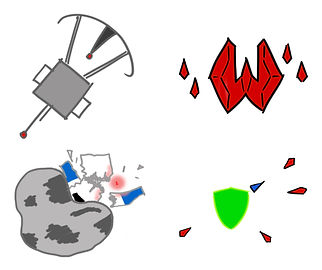
The game is endless and the player's highscore is determined by how many survivors they save before they die. The missions may have modifiers attached, which add secondary objectives and/or modify the main objective.
Day 2 - Revision and Implementation
The movement was fairly simple to implement so it was done on Day 1 itself. The following features were implemented on Day 2:
-
Laser Repeater: The offensive armament for the player, meant to destroy enemy spacecrafts.
-
Survivor object, detects the player and after a countdown, is picked up by the player.
-
Ability to switch between item slots 1,2 and 3.
However, by the end of the day I had come to realize that some features will not be completed and therefore will need to be scrapped. This limitation is primarily due to challenges with programming. Due to this the vast array of tools to choose from was downsized to just 2, the laser and the pulse repeaters.
Day 3 - Assets


Until now I had been using Unity standard assets as placeholders. I began creating 2D assets for the game, starting with a variety of asteroids and a simple player spaceship. A randomizer script was created for the asteroids to randomly assign one of the 4 asteroid sprites.
The pulse repeater was also fully implemented. Both the laser and pulse weapons contain rigidbodies. They have mass and are controlled by adding forces to them. Originally, the base mass for the laser object was large enough to push away asteroids with ease. To correct this, the laser's mass was reduced and the asteroids mass was significantly increased. Inversely the mass of the pulse object was increased to be able to push asteroids away.
Because the lasers and pulses detect using colliders and because the pulse repeater collider is wider, I accidently gave the pulse a shield-like property, being able to block enemy lasers.
Day 4 & 5 - Enemy pathfinding

Unity's default NavMesh is meant for 3D projects and does not have native 2D support. My options at this point were to either find addons for the NavMesh to work in 2D scenes or try out A* Pathfinding. Initially I was going to stick with A* Pathfinding until I couldn't figure out how to update the navigation during runtime. Dynamic navigation is important for this project because every asteroid has a rigidbody attached it and can move around in 2D space. I instead decided to write my own simple navigation script.
Here's how the logic gates have been set up in the script

Day 6 - Endless Scripting and Further Revisions
The sixth day of the event was spent to tying everything together. A Mission Loop was made so that the player can play the game endlessly. The survivor would spawn at a random spot within a minimum and a maximum range. A few variations of Asteroid Clusters were made so that one of them can be chosen and random and spawned around the survivor. The enemy spawn was kept simple (due to time) and instead would spawn enemies based on chance.
Of course, by now it was abundantly clear that the mission modifiers would not be implemented in time for the submission. Therefore, the mission modifiers and secondary objectives were scrapped from the final concept.
Day 7 - UI
The final day of the Game Jam was dedicated to HUD elements and the Main Menu. The Main Menu contained all the information the player needed, objective, controls, hazards, etc. The main player spacecraft was also included so the player can get the feel of the controls before starting the game. This is necessary as the games plays around with the concept of Conservation of Momentum, which, combined with Mouse Aim can be a little tricky to get used to.


A simple HUD marker system was created to show the positions of off-screen elements like enemies and mission objectives. It consists of simple "arrow" markers around the the player vehicle pointing in the direction of the off-screen element and disappears when the element is visible on screen.

A panel was added in the top-left corner to show the basic information of player health, survivors saved and velocity. The velocity text will turn red when travelling faster than a certain amount. This is done because since there is a static background, it is hard to tell how fast one is travelling in the game. To further help mitigate the problem, several asteroids are scattered all over the game space. The idea is that players will be able to perceive their speed better when flying around these rocks.
Closing
I had a great fun participating during this Game Jam. For a first solo Jam, it went surprisingly well. I honestly did not expect to finish the game, mostly because I didn't think I had the skills and knowledge to do this by myself. Apart from practicing time management, I learnt to "design for time". Knowing what is and isn't possible to achieve within a timeframe will be very useful to me and save a lot of time in future projects. In terms of programming, I learnt to create HUD markers for off-screen elements. I am incredibly pleased with how it turned out and look forwards to use it in other projects.
Thanks for reading.